
 JUC 基础
# Java JUC
JUC 是 JDK 中一个包java.util.concurrent的缩写
- java.util.concurrent.atomic(原子性)
- java.util.concurrent.locks(锁)
- java.util.funtion(函数)
# 线程和进程
并发编程的本质是充分利用 CPU 的资源
什么是进程和线程
- 进程:一个程序,程序的集合;一个进程往往包含多个线程,Java 程序默认有两个线程(main 和 gc)
- 线程:如一个进程
typora,同时包含写字和自动保存的两个线程
Java 真的能开启线程吗?并不能,java 无法直接操作硬件,而是用本地方法调用底层的 C++ 实现线程开启,如 Thread 的 start 方法,实际上在调用 native 方法 start0
public synchronized void start() {
        /**
         * This method is not invoked for the main method thread or "system"
         * group threads created/set up by the VM. Any new functionality added
         * to this method in the future may have to also be added to the VM.
         *
         * A zero status value corresponds to state "NEW".
         */
        if (threadStatus != 0)
            throw new IllegalThreadStateException();

        /* Notify the group that this thread is about to be started
         * so that it can be added to the group's list of threads
         * and the group's unstarted count can be decremented. */
        group.add(this);

        boolean started = false;
        try {
            start0();
            started = true;
        } finally {
            try {
                if (!started) {
                    group.threadStartFailed(this);
                }
            } catch (Throwable ignore) {
                /* do nothing. If start0 threw a Throwable then
                  it will be passed up the call stack */
            }
        }
    }
//native本地方法,调用的底层的C++,java无法直接操作硬件
private native void start0();
2
3
4
5
6
7
8
9
10
11
12
13
14
15
16
17
18
19
20
21
22
23
24
25
26
27
28
29
30
31
32
33
什么是并发和并行
- 并发(多线程操作同一个资源):CPU 一核,模拟出来多条线程,快速交替
- 并行(真正的同时运行):CPU 多核,多个线程同时执行;采用线程池提升效率
public class Test {
    public static void main(String[] args) {
        //获取CPU的核数
        //CPU密集型、IO密集型
        System.out.println(Runtime.getRuntime().availableProcessors());
    }
}
2
3
4
5
6
7
线程的六个状态
public enum State {
        NEW, // 新生
        RUNNABLE, // 运行
        BLOCKED, // 阻塞
        WAITING, // 等待
        TIMED_WAITING, // 超时等待
        TERMINATED; // 终止
}
2
3
4
5
6
7
8
wait 和 sleep 的区别
- 来自不同的类:wait() 来自 Object;sleep() 来自 Thread
- 锁的释放:wait 会释放锁;sleep 不会释放锁
- 使用范围:wait 必须在同步代码块中;sleep 可以在任何地方睡
- 是否需要捕获异常(线程都会存在中断异常):wait 不需要捕获异常;sleep 必须要捕获异常,会发生超时等待的情况
# 函数式接口
函数式接口
public class ListTest {
    public static void main(String[] args) {
        List<String> list = Arrays.asList("1", "2", "3");
        list.forEach(s->{System.out.print(s + " ");});
    }
}
2
3
4
5
6
函数式编程,lambda 表达式(Java 8 的特性):用于接口的函数重写实现,等同于实现一个匿名内部类
什么是 OOP 和耦合
- OOP:Object Oriented Programming(面向对象程序设计,一种编程架构)
- 耦合性:降低耦合性,解耦
# synchronized
用函数式接口新建线程,同时对“卖”操作通过 synchronized 上锁
public class SaleTickets1 {
    public static void main(String[] args) {
        Tickets1 t = new Tickets1();
        new Thread(()->{
            for (int i = 0; i < 30; i++) {
                t.sale();
            }
        }, "A").start();

        new Thread(()->{
            for (int i = 0; i < 30; i++) {
                t.sale();
            }
        }, "B").start();

        new Thread(()->{
            for (int i = 0; i < 30; i++) {
                t.sale();
            }
        }, "C").start();
    }
}


class Tickets1{
    private int num = 25;

    public synchronized void sale(){
        if(num>0){
            System.out.println(Thread.currentThread().getName()+"售出第"+num--+"张票,剩余:"+num);
        }
    }
}
2
3
4
5
6
7
8
9
10
11
12
13
14
15
16
17
18
19
20
21
22
23
24
25
26
27
28
29
30
31
32
33
Lock 是顶层的锁接口 interface,其包含三个实现类
- ReentrantLock
- ReentrantReadWriteLock.ReadLock
- ReentrantReadWriteLock.WriteLock
Synchronized 和 Lock 的区别(自动挡和手动挡)
- Synchronized 是一个内置的 java 关键字,Lock 是一个 java 类
- Synchronized 无法判断获取锁的状态,Lock 可以判断是否获取到了锁
- Synchronized 会自动释放锁,Lock 必须要手动释放锁。否则会死锁
- Synchronized 线程1(获得锁、阻塞)、线程2(会一直等待),而 Lock 不一定会一直等
- Synchronized 为不可重入锁,不可以中断,非公平;Lock 为可重入锁,可以判断锁,默认非公平但可设置
- Synchronized 适合锁少量的代码同步问题,Lock 锁适合锁大量的同步代码(Lock 锁的灵活度特别高)
可重入锁:可以多次获取同一个锁而不发生死锁的锁,如一个 lock 锁可以多次调用 lock() 函数而正常运行,即获取锁这一操作并不会引发异常
在高并发情况下,synchronized 会引起性能问题:一是太悲观了(会一直等);二是细粒度太低了,控制不够灵活
# 八锁问题
关于 Java 锁的八个问题
- 两个同步方法 p.sendMs() 和 p.call() 谁先执行?
- 若在 sendMs() 中令其睡眠 2 秒,谁先执行?
操作同一对象时,一个对象只对应一把锁,对于同步方法,哪个先拿到锁哪个先执行,另一个得等锁解开后才能执行,而谁先拿到与代码的顺序有关,在此处 sendMs() 先拿到锁,必然先执行sendMs(),同时 call() 被锁上不能执行
public class Test1 {
    public static void main(String[] args) throws InterruptedException {
        Phone1 p = new Phone1();
        new Thread(()->{p.sendMs();}, "A").start();

        TimeUnit.SECONDS.sleep(2);

        new Thread(()->{p.call();}, "B").start();
    }
}

class Phone1{
    public synchronized void sendMs(){
        TimeUnit.SECONDS.sleep(2);
        System.out.println(Thread.currentThread().getName() + " 发送信息");
    }

    public synchronized void call(){
        System.out.println(Thread.currentThread().getName() + " 拨打电话");
    }
}
2
3
4
5
6
7
8
9
10
11
12
13
14
15
16
17
18
19
20
21
- 当同步方法碰上普通方法 p.sendMs() 和 p.sayHello() 谁先执行?sayHello() 并不是同步方法,不受锁的影响,由于 sendMs() 睡眠了2s,sayHello() 自然将在其之前被执行
import java.util.concurrent.TimeUnit;

public class Test2 {
    public static void main(String[] args){
        Phone2 p = new Phone2();
        new Thread(()->{
            try {
                p.sendMs();
            } catch (InterruptedException e) {
                e.printStackTrace();
            }
        }, "B").start();
        new Thread(()->{p.sayHello();}, "A").start();

    }

}

class Phone2{
    public synchronized void sendMs() throws InterruptedException {
        TimeUnit.SECONDS.sleep(2);
        System.out.println(Thread.currentThread().getName() + " 发送信息");
    }

    public void sayHello(){
        System.out.println(Thread.currentThread().getName() + " Hello");
    }
}
2
3
4
5
6
7
8
9
10
11
12
13
14
15
16
17
18
19
20
21
22
23
24
25
26
27
28
- 对于两个不同对象p1、p2,问普通同步方法 p1.sendMs() 和 p2.call() 谁先执行?当存在两个对象时,一个对象一把锁,各自的同步方法互不影响,自然低延迟的 call() 方法先执行
public class Test3 {
    public static void main(String[] args){
        Phone3 p1 = new Phone3();
        Phone3 p2 = new Phone3();

        new Thread(()->{
            try {
                p1.sendMs();
            } catch (InterruptedException e) {
                e.printStackTrace();
            }
        }).start();

        new Thread(()->{p2.call();}).start();
    }
}


class Phone3{
    public synchronized void sendMs() throws InterruptedException {
        TimeUnit.SECONDS.sleep(2);
        System.out.println(Thread.currentThread().getName() + " 发送信息");
    }

    public synchronized void call() {
        System.out.println(Thread.currentThread().getName() + " 拨打电话");
    }
}
2
3
4
5
6
7
8
9
10
11
12
13
14
15
16
17
18
19
20
21
22
23
24
25
26
27
28
- 对普通同步方法加上 static 进行修饰(静态同步方法), p.sendMs() 和 p.call() 谁先执行?static synchronized 方法,对整个类进行同步,此时 sendMs() 和 call() 用的是同一把锁,自然后者会被锁住,sendMs() 先执行
import java.util.concurrent.TimeUnit;

public class Test4 {
    public static void main(String[] args){
        Phone4 p = new Phone4();

        new Thread(()->{
            try {
                p.sendMs();
            } catch (InterruptedException e) {
                e.printStackTrace();
            }
        }).start();

        new Thread(()->{p.call();}).start();
    }
}


class Phone4{
    public static synchronized void sendMs() throws InterruptedException {
        TimeUnit.SECONDS.sleep(2);
        System.out.println(Thread.currentThread().getName() + " 发送信息");
    }

    public static synchronized void call() {
        System.out.println(Thread.currentThread().getName() + " 拨打电话");
    }
}
2
3
4
5
6
7
8
9
10
11
12
13
14
15
16
17
18
19
20
21
22
23
24
25
26
27
28
29
- 第 5 个问题的深化理解,对于类的不同的两个对象 p1、p2,当 synchronized 有 static 修饰,p1.sendMs() 和 p2.call() 谁先执行?当有 static 修饰 synchronized 方法时,同步锁锁的是当前这个类(Class对象、类模板),此时 p1.sendMs() 和 p2.call() 用的是同一把锁,call() 被 sendMs() 锁住,自然 sendMs() 先执行
public class Test4 {
    public static void main(String[] args){
        Phone4 p1 = new Phone4();
        Phone4 p2 = new Phone4();

        new Thread(()->{
            try {
                p1.sendMs();
            } catch (InterruptedException e) {
                e.printStackTrace();
            }
        }).start();

        new Thread(()->{p2.call();}).start();
    }
}


class Phone4{
    public static synchronized void sendMs() throws InterruptedException {
        TimeUnit.SECONDS.sleep(2);
        System.out.println(Thread.currentThread().getName() + " 发送信息");
    }

    public static synchronized void call() {
        System.out.println(Thread.currentThread().getName() + " 拨打电话");
    }
}
2
3
4
5
6
7
8
9
10
11
12
13
14
15
16
17
18
19
20
21
22
23
24
25
26
27
28
- 当静态同步方法碰到普通同步方法,用同一对象调用,sendMs 和 call 谁先执行?很明显此时 p.sendMs() 和 p.call() 用的不是同一把锁,前者用的是类模板的锁,后者用的是当前对象的锁,前者并不对后者产生约束,加上睡眠了 2s,自然 call() 先执行
public class Test5 {
    public static void main(String[] args) {
        Phone5 p = new Phone5();
        Phone5 p1 = new Phone5();
        Phone5 p2 = new Phone5();

        new Thread(()->{
            try {
                p.sendMs();
            } catch (InterruptedException e) {
                e.printStackTrace();
            }
        }, "p.sendMs").start();

        new Thread(()->{p.call();}, "p.call").start();
    }
}

class Phone5{
    public static synchronized void sendMs() throws InterruptedException {
        TimeUnit.SECONDS.sleep(2);
        System.out.println(Thread.currentThread().getName() + " 发送信息");
    }

    public synchronized void call() {
        System.out.println(Thread.currentThread().getName() + " 拨打电话");
    }
}
2
3
4
5
6
7
8
9
10
11
12
13
14
15
16
17
18
19
20
21
22
23
24
25
26
27
28
当 7 中例子换为两个对象 p1 和 p2,问 p1.sendMs() 和 p2.call() 谁先执行?与 7 同理,二者用的并不是同一把锁,之间互不影响,低延迟的 call 先执行
- static synchronized:锁的是 Class,唯一的一个模板
- synchronized:锁的是 new this,具体的一个对象
# 线程安全类
回顾一下 Collection 集合类,他们都是线程不安全的,对于关键的增删操作都是未上锁的
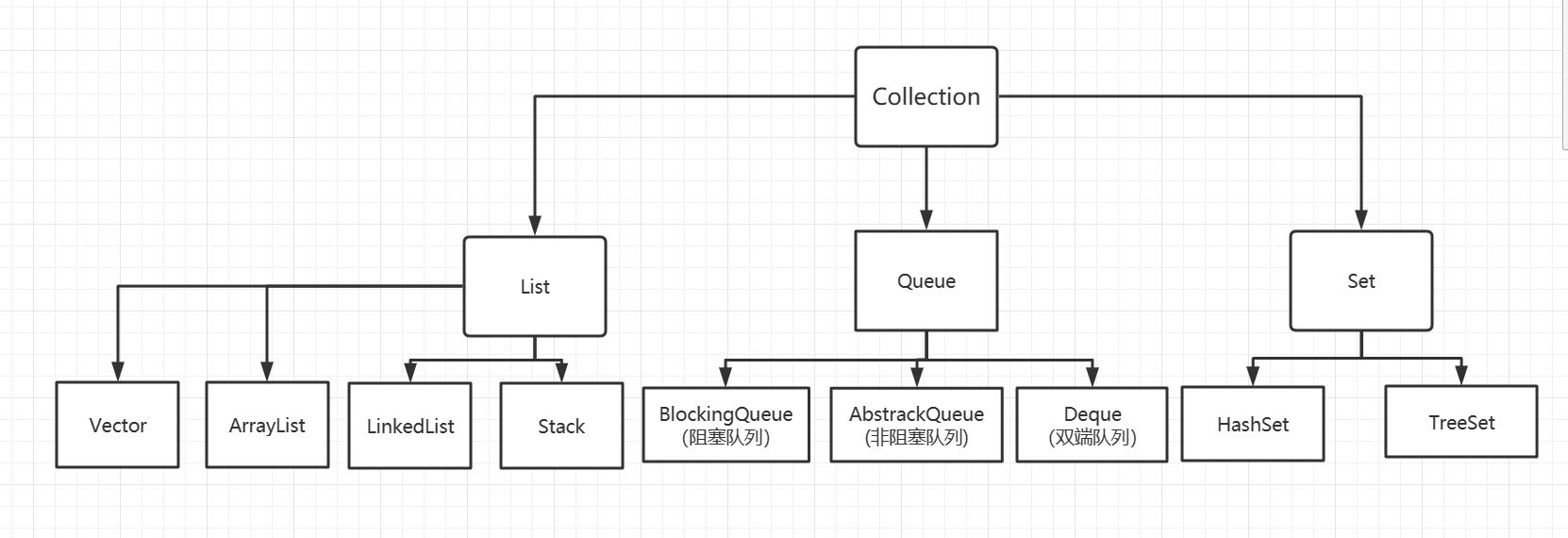
# 安全线性集合
顺序表或链表
写入时复制(Copy on Write),计算机程序设计领域的一种优化策略
以下代码将报错 java.util.ConcurrentModificationException 并发修改异常
import java.util.ArrayList;
import java.util.Arrays;
import java.util.List;
import java.util.UUID;

public class ListTest {
    public static void main(String[] args) {
        List<String> l = new ArrayList<>();
        for (int i = 0; i < 10; i++) {
            new Thread(()->{
                l.add(UUID.randomUUID().toString().substring(0, 5));
                System.out.println(l);
            }, String.valueOf(i)).start();
        }
    }
}
2
3
4
5
6
7
8
9
10
11
12
13
14
15
16
解决方案
1️⃣ Vector
List<String> list = new Vector<>();
2️⃣ Collections.synchronizedList
List<String> l = Collections.synchronizedList(new ArrayList());
3️⃣ CopyOnWriteArrayList
List<String> l = new CopyOnWriteArrayList<>();
与 ArrayList 相同,在 CopyOnWriteArrayList 内部同样维护了一个数组,不同的是该数组有 transient/volatile 修饰
private transient volatile Object[] array;
其 add 方法采取写入时复制的方式,即将原数组复制一份(长度+1),再插入新元素,线程安全性由 lock 锁保证
与 Vector 不同,CopyOnWriteArrayList 中并无 synchronized 修饰,故其效率较高
public boolean add(E e) {
    final ReentrantLock lock = this.lock;
    lock.lock();
    try {
        Object[] elements = getArray();
        int len = elements.length;
        Object[] newElements = Arrays.copyOf(elements, len + 1);
        newElements[len] = e;
        setArray(newElements);
        return true;
    } finally {
        lock.unlock();
    }
}
2
3
4
5
6
7
8
9
10
11
12
13
14
在写入时避免覆盖造成数据问题:读写分离
# 安全非线性集合
Iterable → Collection → List + Set + BlockingQueue(阻塞队列)
与 List 同理可得 Set 同样线程不安全,将报错 java.util.ConcurrentModificationException
import java.util.HashSet;
import java.util.Set;
import java.util.UUID;

public class SetTest {
    public static void main(String[] args) {
        Set<String> set = new HashSet<>();
        for(int i = 0; i < 10; i++){
            new Thread(()->{
                set.add(UUID.randomUUID().toString().substring(0, 5));
                System.out.println(Thread.currentThread().getName() + set);
            }, String.valueOf(i)).start();
        }
    }
}
2
3
4
5
6
7
8
9
10
11
12
13
14
15
解决方案
1️⃣ Collections.synchronizedSet
Set<String> set = Collections.synchronizedSet(new HashSet<>());
2️⃣ CopyOnWriteArraySet
Set<String> set = new CopyOnWriteArraySet<>();
HashSet 的底层:HashMap
public HashSet() {
    map = new HashMap<>();
}

//CopyOnWriteArraySet维护的map由transient修饰
private transient HashMap<E,Object> map;

public boolean add(E e) {
    return map.put(e, PRESENT)==null;
}

//PRESENT是一个不变的值
private static final Object PRESENT = new Object();
2
3
4
5
6
7
8
9
10
11
12
13
Map:哈希表(散列表),拉链法解决冲突
- 默认初始容量:16
- 默认加载因子:0.75
HashMap 和 LinkedHashMap 的区别:多了一个双向链表指代前驱后继关系
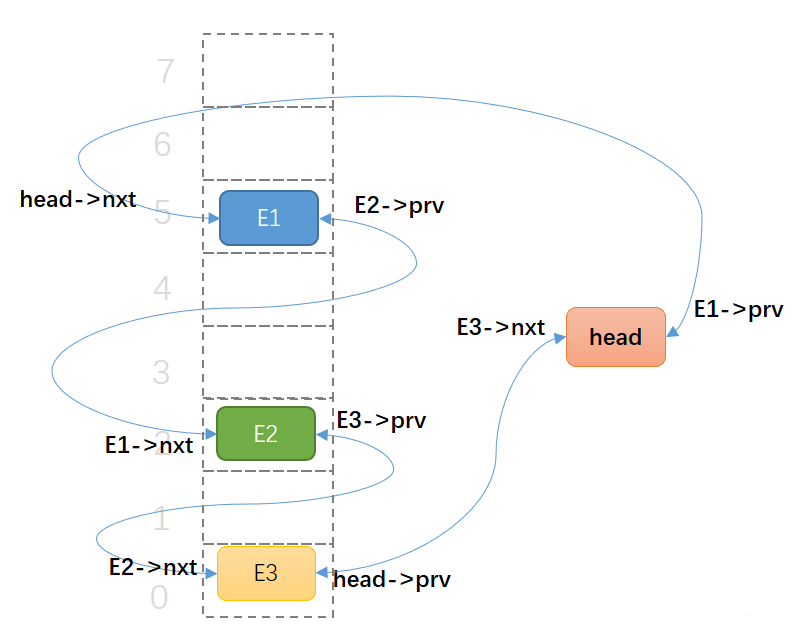
并发的解决方案
1️⃣ Collections.synchronizedMap
Map<String, String> map = Collections.synchronizedMap(new HashMap<>());
2️⃣ ConcurrentHashMap
Map<String, String> map = new ConcurrentHashMap<>();
其底层数据多由 transient/volatile 修饰,方法关键步骤由 synchronized 修饰,以保证读和写均为原子操作,即读时不能写,写时不能读
# 线程安全辅助类
CountDwonLatch:减法器,Latch(门栓),用于倒计时,count 为倒计的数量
CountDownLatch(int count);
倒数,令 count 减一
countDown()
等待方法,阻塞,当 count 为 0 时唤醒,不等了
await();
测试代码,需注意的是,我开启了一条线程输出 “All Out”,它将在 count = 0 时才会被执行,即等待计数结束
import java.util.concurrent.CountDownLatch;

public class CountDownLatchTest {
    public static void main(String[] args) {
        CountDownLatch c = new CountDownLatch(10);

        new Thread(()->{
            try {
                c.await();
            } catch (InterruptedException e) {
                e.printStackTrace();
            }finally {
                System.out.println("All Out");
            }
        }).start();

        for (int i = 0; i < 10; i++) {
            new Thread(()->{
                System.out.println(Thread.currentThread().getName() + " Go Out");
                c.countDown();
            }, String.valueOf(i+1)).start();
        }
    }
}
2
3
4
5
6
7
8
9
10
11
12
13
14
15
16
17
18
19
20
21
22
23
24
结果输出
1 Go Out
3 Go Out
2 Go Out
6 Go Out
8 Go Out
9 Go Out
7 Go Out
5 Go Out
4 Go Out
10 Go Out
All Out

Process finished with exit code 0
2
3
4
5
6
7
8
9
10
11
12
13
CycilcBarrier:与 CountDwonLatch 对应,这是一个加法器,当达到预定的 parties 时 await() 结束,触发 lambda 函数
// parties 为所经历的线程最大数
// lambda 表达式中为当经历线程数达到 parties 时执行的语句
CyclicBarrier(int parties, interface{})
2
3
计数、等待方法:在线程中执行 await 时,parties+1,同时判断是否达到初始化时的最大值,达到则执行构造方法中的 λ 表达式
await();
测试代码
public class CyclicBarrierTest {
    public static void main(String[] args) {
        CyclicBarrier c = new CyclicBarrier(7, ()->{
            System.out.println("集齐七颗龙珠,召唤神龙");
        });

        for (int i = 0; i < 7; i++) {
            final int temp = i+1;
            new Thread(()->{
                System.out.println("收集到第" + temp + "颗龙珠");
                try {
                    c.await();
                } catch (InterruptedException e) {
                    e.printStackTrace();
                } catch (BrokenBarrierException e) {
                    e.printStackTrace();
                }
            }, String.valueOf(i+1)).start();
        }
    }
}
2
3
4
5
6
7
8
9
10
11
12
13
14
15
16
17
18
19
20
21
结果输出
收集到第1颗龙珠
收集到第7颗龙珠
收集到第4颗龙珠
收集到第3颗龙珠
收集到第5颗龙珠
收集到第2颗龙珠
收集到第6颗龙珠
集齐七颗龙珠,召唤神龙

Process finished with exit code 0
2
3
4
5
6
7
8
9
10
当计数达到 7 时,await() 结束,不等了,触发 CyclicBarrier 构造时传入的匿名函数
Semaphore:信号量,可加可减
- acquire():获得,如果信号量满了,等待,直到被释放为止
- release():释放,会将信号量释放 +1,然后唤醒等待的线程
public class SemaphoreTest {
    public static void main(String[] args) {
        //初始化线程数量(停车位)
        Semaphore semaphore = new Semaphore(4);

        for (int i = 0; i < 7; i++) {
            new Thread(()->{
                try {
                    //acquire():获得许可,阻塞,判断当前是否有闲置的许可
                    semaphore.acquire();
                    System.out.println(Thread.currentThread().getName() + " 停车");
                    TimeUnit.SECONDS.sleep(2);
                } catch (InterruptedException e) {
                    e.printStackTrace();
                } finally {
                    System.out.println(Thread.currentThread().getName() + " 离开车位");
                    //释放许可
                    semaphore.release();
                }
            }, String.valueOf(i+1)).start();
        }
    }
}
2
3
4
5
6
7
8
9
10
11
12
13
14
15
16
17
18
19
20
21
22
23
作用
- 多个共享资源互斥的使用(如停车位)
- 并发限流,控制最大的线程数
ReadWriteLock:读写锁,与 Lock 锁的用法类似,进入方法时加锁,将业务代码放在 try / catch 语句中,在 finally 中解锁
- 读可以被多个线程读,写只能由单线程写
- 写的时候不能读,读的时候不能写
注意读写锁并没有 Condition,它自身在加锁解锁的过程中完成了 Condition 的精确控制,提高了锁细粒度
public class ReadWriteLockTest {
    public static void main(String[] args) {
        MyCacheLock myCache = new MyCacheLock();

        for (int i = 0; i < 10; i++) {
            final int temp = i;
            new Thread(()->{
                myCache.put(temp, UUID.randomUUID().toString().substring(0, 3));
            }, String.valueOf(i)).start();
        }

        for (int i = 0; i < 10; i++) {
            final int temp = i;
            new Thread(()->{
                myCache.get(temp);
            }, String.valueOf(i)).start();
        }
    }
}

class MyCacheLock{

    private volatile Map<Integer, String> map = new HashMap<>();

    //读写锁,更加细粒度的控制
    private ReadWriteLock readWriteLock = new ReentrantReadWriteLock();

    //写
    public void put(Integer key, String val){
        readWriteLock.writeLock().lock();
        try{
            System.out.println(Thread.currentThread().getName() + "正在写入");
            map.put(key, val);
            System.out.println(Thread.currentThread().getName() + "写入完毕");
        }catch (Exception e){
            e.printStackTrace();
        }finally {
            readWriteLock.writeLock().unlock();
        }
    }
    //读
    public void get(Integer key){
        readWriteLock.readLock().lock();
        try{
            System.out.println(Thread.currentThread().getName() + "正在读取");
            map.get(key);
            System.out.println(Thread.currentThread().getName() + "读取完毕");
        }catch (Exception e){
            e.printStackTrace();
        }finally {
            readWriteLock.readLock().unlock();
        }
    }
}


class MyCache{
    private Map<String, String> map = new HashMap<>();

    public void put(String key, String val){
        System.out.println(Thread.currentThread().getName() + "正在写入");
        map.put(key, val);
        System.out.println(Thread.currentThread().getName() + "写入完毕");
    }

    public void get(String key){
        System.out.println(Thread.currentThread().getName() + "正在读取");
        map.get(key);
        System.out.println(Thread.currentThread().getName() + "读取完毕");
    }
}
2
3
4
5
6
7
8
9
10
11
12
13
14
15
16
17
18
19
20
21
22
23
24
25
26
27
28
29
30
31
32
33
34
35
36
37
38
39
40
41
42
43
44
45
46
47
48
49
50
51
52
53
54
55
56
57
58
59
60
61
62
63
64
65
66
67
68
69
70
71
用 MyCache 跑多线程时,会出现多个线程同时“正在写入”的情况,这样很明显很不安全,加锁后解决这一问题,即同时只会有单条线程进行“写”的操作
# Callable 抽象类
Runnable 和 Callable 的区别
- Callable 有返回值
- Callable 可以抛出异常
- 方法不同:run() → call()
- Runnable 效率低于 Callable
Thread 只能 start 继承了 Runnable(重写了run方法) 的类,怎么用 Thread 去跑继承了 Callable 的类呢?
阅读 jdk 文档可以发现 Runnable 有一个实现类:FutureTask
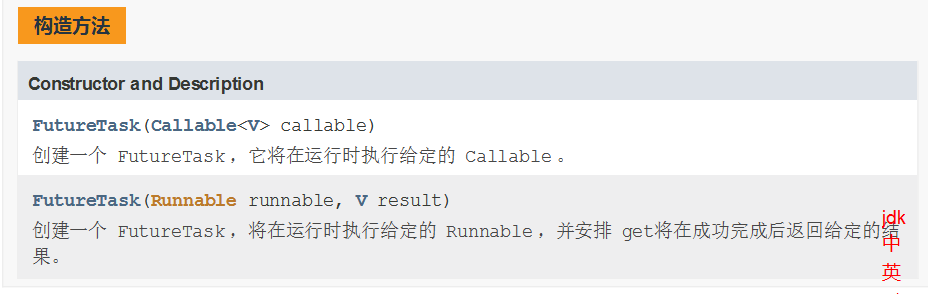
FutureTask 既是 Runnable 的实现类,又可以由 Callable 进行构造,如此便实现了 Callable 和 Thread 的连接
import java.util.concurrent.Callable;
import java.util.concurrent.FutureTask;

public class CallableTest {
    public static void main(String[] args) {
        new Thread(new FutureTask<>(new MyThread())).start();
        System.out.println();
    }
}

class MyThread implements Callable<String>{
    @Override
    public String call() throws Exception {
        System.out.println("wdnmd");
        return "Hello Callable";
    }
}
2
3
4
5
6
7
8
9
10
11
12
13
14
15
16
17
如何获取 Callable 的返回值?
MyThread mythread = new MyThread();
FutureTask<String> futuretask = new FutureTask<>(t);
new Thread(futuretask).start();
String res = futuretask.get();
2
3
4
注意
- FutureTask 的 get 方法是阻塞的,也就是说,只有 call() 方法跑完之后,才会 get 到值,若 get 在 start 前,则程序死锁
- call() 方法是有缓存的,开两条线程跑同一个 call 函数,只会有一个结果,如上述代码若开两条线程只会输出一句 wdnmd
# 流式和分治
# Stream 流式计算
什么是 Stream 流式计算:将数据作为流进行处理,例如视频流处理,这是和包处理相对应的,例如 HTTP 请求返回或者 Kafka 日志批处理
对 Person 类
@Data
public class Person {
    private int id;
    private String name;
    private int age;
}
2
3
4
5
6
用一行代码完成下列筛选
- ID 为偶数
- 年龄大于等于 23
- 名字转换为大写字母
- 倒序输出
- 只输出一个用户
lambda 表达式 + 链式编程 + 函数式接口 + stream 计算
public class StreamTest {
    public static void main(String[] args) {
        Person p1 = new Person(1, "a", 23);
        Person p2 = new Person(2, "b", 27);
        Person p3 = new Person(3, "c", 17);
        Person p4 = new Person(4, "d", 41);
        Person p5 = new Person(5, "e", 25);

        List<Person> list = Arrays.asList(p1, p2, p3, p4, p5);
        list.stream()
                .filter((u)-> {return u.getAge()>=23;})
                .filter((u)-> {return u.getId()%2==0;})
                .map((u)-> {return u.getName().toUpperCase();})
                .sorted((u1, u2)->{return u2.compareTo(u1);})
                .limit(1)
                .forEach((u)->{System.out.println(u);});
    }
}
2
3
4
5
6
7
8
9
10
11
12
13
14
15
16
17
18
这就是一种流式计算,将 Person 数据作为 Stream 流进行处理
# Fork / Join
分支 / 合并,在 jdk1.7 中出现,并发执行任务,在大数据量时提高效率,本质上就是归并,把大任务拆分为小任务,再把小任务结果合并
- 特点:工作窃取,每个工作流维护一个双端队列,当 B 线程结束后而 A 线程未结束,B 将窃取 A 的工作,从后向前执行
具体实现
1️⃣ 将运算类继承 RecursiveAction 或 RecursiveTask,重写 computer 方法(注意泛型:此处泛型类型规定了 compute 方法的返回值)
public class ForkJoinTest extends RecursiveTask<Long> {

    private long start;
    private long end;

    private long temp = 10000L;

    public ForkJoinTest(long start, long end) {
        this.start = start;
        this.end = end;
    }

    //重写computer
    @Override
    protected Long compute() {
        if(end-start<temp){
            long sum = 0L;
            for (long i = start; i <= end; i++) {
                sum += i;
            }
            return sum;
        }else{
            long middle = (start+end)/2;
            ForkJoinTest task1 = new ForkJoinTest(start, middle);
            task1.fork();
            ForkJoinTest task2 = new ForkJoinTest(middle+1, end);
            task2.fork();
            return task1.join()+task2.join();
        }
    }
}
2
3
4
5
6
7
8
9
10
11
12
13
14
15
16
17
18
19
20
21
22
23
24
25
26
27
28
29
30
31
2️⃣ 开辟一个 ForkJoinPool,用池中的 submit 方法或 execute 方法执行 Task,如此提高的运算效率,比用普通的 for 循环逐个加约快 130 倍
public void test2() throws ExecutionException, InterruptedException {
    long start = System.currentTimeMillis();

    //创建ForkJoin池
    ForkJoinPool pool = new ForkJoinPool();

    //创建任务
    ForkJoinTask<Long> task = new ForkJoinTest(0, 10_0000_0000);

    //此处 submit.get() 和 execute(task) 后的 task.get() 所得其实是一样的
    //执行任务
    ForkJoinTask<Long> submit = pool.submit(task);
    pool.execute(task);
    submit.get();
    long end = System.currentTimeMillis();

    //关闭池
    pool.shutdown();

    //获取结果
    System.out.println("和:" + task.get() + " 时间:" + (end-start));
}
2
3
4
5
6
7
8
9
10
11
12
13
14
15
16
17
18
19
20
21
22
阅读源码还可知 ForkJoinPool.execute() 还可以执行 Runnable task,即实现了 Runnable 接口的任务,重写 run 方法,同理还可以扩展至 Callable 接口,通过 FutureTask 将 Callable 和 Runnable 连接,放在 execute 中执行
public void execute(Runnable task) {
    if (task == null)
        throw new NullPointerException();
    ForkJoinTask<?> job;
    if (task instanceof ForkJoinTask<?>) // avoid re-wrap
        job = (ForkJoinTask<?>) task;
    else
        job = new ForkJoinTask.RunnableExecuteAction(task);
    externalPush(job);
}
2
3
4
5
6
7
8
9
10
3️⃣ 流式求和
public void test3(){
    long start = System.currentTimeMillis();
    long sum = LongStream.rangeClosed(0, 10_0000_0000).parallel().reduce(0, Long::sum);
    long end = System.currentTimeMillis();
    System.out.println("和:" + sum + " 时间:" + (end-start));
}
2
3
4
5
6
# Future 异步回调
Future设计的初衷:对将来的某个事件的结果进行建模

继承关系:Future → CompletableFuture
public class Demo01 {
    public static void main(String[] args) throws ExecutionException, InterruptedException {
        //有返回值的异步回调:supplyAsync
        CompletableFuture<String> completableFuture = CompletableFuture.supplyAsync(()->{
            System.out.println("哈哈哈");
            //int i = 9/0;
            return "异步回调";
        });

        // t:当正确执行时返回返回值,报错时返回null
        // u:当错误时返回错误信息,正确时返回null
        //exceptionally(e):e为异常,注意需要在该函数接口中重新返回一个值代替错误执行的返回值
        System.out.println(completableFuture.whenComplete((t, u) -> {
            System.out.println("t:" + t);
            System.out.println("u:" + u);
        }).exceptionally((e) -> {
            System.out.println("Message:" + e.getMessage());
            return "错误了啊";
        }).get());
    }
}
2
3
4
5
6
7
8
9
10
11
12
13
14
15
16
17
18
19
20
21
为什么代码这么奇怪?是因为 supplyAsync 和 runAsync 是 CompletableFuture 的静态方法,返回一个 CompletableFuture 对象
| 方法 | supplyAsync | runAsync |
|---|---|---|
| get | 执行supplier并获取返回值 | 执行runnable |
| exceptionally | 捕捉异常并返回错误回调 | 捕捉异常并作出反应 |
| whenComplete | 返回(T, U),T为返回值,U为错误信息 | 返回(T, U),T为null,U为错误信息 |
注意 get / exceptionally / whenComplete 方法阻塞但异步,不影响其他线程
两种异步回调
- 成功回调:当 CompletableFuture 正常跑 runAsync 或 supplyAsync 后,成功返回结果,称作成功回调
- 错误回调:当跑 runAsync 或 supplyAsync 时发生错误,我们用 exceptionally 捕捉异常并作出反应,在 supplyAsync 中可返回错误回调
# Java 线程池
池化技术,三大方法七大参数
程序的运行的本质:占用系统的资源 —> 优化资源的使用 —> 池化技术
- 一些池子:线程池、连接池、内存池、对象池、简历池......
池化技术:事先准备好一些资源,需要使用则从池中取,用完后还回,比如小整数的存储
线程池的优点
- 降低资源的消耗
- 提高响应的速度
- 方便管理
- 线程复用、可以控制最大并发
# 阻塞队列
当并发过高,所有核心线程都被占用,任务不得不阻塞等待
JUC 中的阻塞队列策略
- 有界队列(如
ArrayBlockingQueue):需设置合理容量(如100~1000),避免内存溢出。 - 无界队列(如
LinkedBlockingQueue):慎用,可能导致OOM(默认容量为Integer.MAX_VALUE) - 同步队列(
SynchronousQueue):无缓冲,直接创建新线程,适合高吞吐短任务
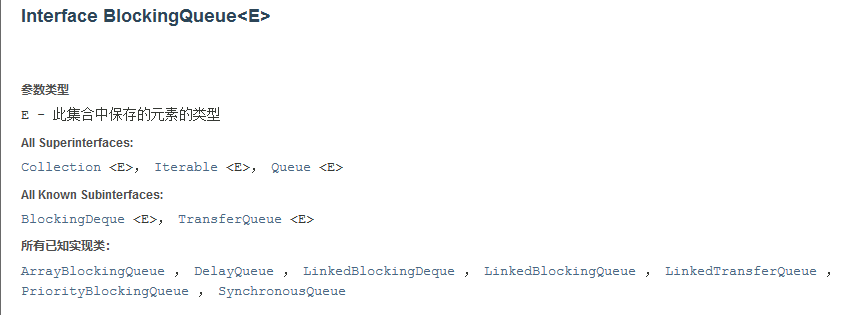
# ArrayBlockingQueue
有界阻塞队列:添加、移除、查找
| 操作 | 抛出异常 | 有返回值,不抛出异常 | 阻塞等待(一直阻塞) | 等待超时 |
|---|---|---|---|---|
| 添加 | add() | offer() | put() | offer() |
| 移除 | remove() | poll() | take() | poll() |
| 返回队首元素 | element() | peek() | / | / |
示例
/**
* 抛出异常
*/
public void test1(){
    BlockingQueue<String> blockingQueue = new ArrayBlockingQueue<>(3);

    //返回 boolean,添加成功则返回 true
    System.out.println(blockingQueue.add("a")
    System.out.println(blockingQueue.add("b"));
    System.out.println(blockingQueue.add("c"));

    //当队列已满,继续 add(),将报错 java.lang.IllegalStateException: Queue full
    //System.out.println(blockingQueue.add("d"));

    for (int i = 0; i < 3; i++) {
        //element 仅返回队首元素
        System.out.println(blockingQueue.element());
        //remove 同样返回队首元素,同时移除
        blockingQueue.remove();
    }
	//当队列已空,继续 remove,将报错 java.util.NoSuchElementException
    //System.out.println(blockingQueue.remove());
}
/**
* 不抛出异常,有返回值
*/
public void test2(){
    BlockingQueue<String> blockingQueue = new ArrayBlockingQueue<>(3);
    System.out.println(blockingQueue.offer("a"));
    System.out.println(blockingQueue.offer("b"));
    System.out.println(blockingQueue.offer("c"));

    //当队列已满,继续 offer,将不成功,并且返回 false,不抛出异常
    System.out.println(blockingQueue.offer("d"));

    for (int i = 0; i < 3; i++) {
        System.out.println(blockingQueue.peek());
        blockingQueue.poll();
    }
    //当队列已空,继续 poll,将得到 null,不抛出异常
    System.out.println(blockingQueue.poll());
}

/**
* 等待,阻塞
*/
public void test3() throws InterruptedException {
    BlockingQueue<String> blockingQueue = new ArrayBlockingQueue<>(3);
    blockingQueue.put("a");
    blockingQueue.put("b");
    blockingQueue.put("c");

    //此时队列已满,若继续向里put,将一直阻塞,直到队列中有空余位置
    //blockingQueue.put("d");

    for (int i = 0; i < 3; i++) {
        System.out.println(blockingQueue.take());
    }
    //此时队列已空,若继续take,同样会一直阻塞,直到队列中由元素了被唤醒执行
    //System.out.println(blockingQueue.take());
}

/**
* 超时等待
* long timeLimit:超时等待时间
* TimeUnit timeunit:时间单位
*/
public void test4() throws InterruptedException {
    BlockingQueue<String> blockingQueue = new ArrayBlockingQueue<>(3);
    System.out.println(blockingQueue.offer("a"));
    System.out.println(blockingQueue.offer("b"));
    System.out.println(blockingQueue.offer("c"));

    //超时等待 2 秒,超出 2 秒返回false,不继续等待
    System.out.println(blockingQueue.offer("d", 2, TimeUnit.SECONDS));

    for (int i = 0; i < 3; i++) {
        System.out.println(blockingQueue.poll());
    }
    //同理等待 2 秒,超出 2 秒则返回null
    System.out.println(blockingQueue.poll(2, TimeUnit.SECONDS));
}
2
3
4
5
6
7
8
9
10
11
12
13
14
15
16
17
18
19
20
21
22
23
24
25
26
27
28
29
30
31
32
33
34
35
36
37
38
39
40
41
42
43
44
45
46
47
48
49
50
51
52
53
54
55
56
57
58
59
60
61
62
63
64
65
66
67
68
69
70
71
72
73
74
75
76
77
78
79
80
81
82
# SynchronousQueue
同步队列:没有容量,进去一个元素,必须等待取出来以后,才可以继续往里放一个元素(有点像单一的信号量),put() / take()
/**
 * 同步队列
 */
public class SynchronizedQueueTest {
    public static void main(String[] args) {
        BlockingQueue<String> blockingQueue = new SynchronousQueue<>();
        new Thread(()->{
            try {
                System.out.println(Thread.currentThread().getName()+" put 1");
                blockingQueue.put("1");
                System.out.println(Thread.currentThread().getName()+" put 2");
                blockingQueue.put("2");
                System.out.println(Thread.currentThread().getName()+" put 3");
                blockingQueue.put("3");
            } catch (InterruptedException e) {
                e.printStackTrace();
            }
        }, "T1").start();

        new Thread(()->{
            try{
                TimeUnit.SECONDS.sleep(1);
                System.out.println(Thread.currentThread().getName()+" take "+blockingQueue.take());
                TimeUnit.SECONDS.sleep(1);
                System.out.println(Thread.currentThread().getName()+" take "+blockingQueue.take());
                TimeUnit.SECONDS.sleep(1);
                System.out.println(Thread.currentThread().getName()+" take "+blockingQueue.take());
            }catch (InterruptedException e){
                e.printStackTrace();
            }
        }, "T2").start();
    }
}
2
3
4
5
6
7
8
9
10
11
12
13
14
15
16
17
18
19
20
21
22
23
24
25
26
27
28
29
30
31
32
33
结果:
T1 put 1
T2 take 1
T1 put 2
T2 take 2
T1 put 3
T2 take 3

Process finished with exit code 0
2
3
4
5
6
7
8
# 三大方法
单例线程池
ExecutorService threadPool = Executors.newSingleThreadExecutor();
自定义最大线程池
ExecutorService threadPool = Executors.newFixedThreadPool(5);
自适应线程池
ExecutorService threadPool = Executors.newCachedThreadPool();
测试代码:在业务跑完后一定要 shutdown() 关闭线程池,否则会一直阻塞
public class Test1 {
    public static void main(String[] args) {
        //ExecutorService threadPool = Executors.newSingleThreadExecutor();
        //ExecutorService threadPool = Executors.newFixedThreadPool(5);
        ExecutorService threadPool = Executors.newCachedThreadPool();

        try{
            for (int i = 0; i < 100; i++) {
                threadPool.execute(()->{
                    System.out.println(Thread.currentThread().getName() + " ok");
                });
            }
        }catch (Exception e){
            e.printStackTrace();
        }finally {
            threadPool.shutdown();
        }
    }
}
2
3
4
5
6
7
8
9
10
11
12
13
14
15
16
17
18
19
# 七大参数
通过源码可以发现,三大方法中底层返回的都与一个 ThreadPoolExecutor 方法有关,即线程池的构造方法
public static ExecutorService newSingleThreadExecutor() {
    return new FinalizableDelegatedExecutorService
        (new ThreadPoolExecutor(1, 1,
                                0L, TimeUnit.MILLISECONDS,
                                new LinkedBlockingQueue<Runnable>()));
}

public static ExecutorService newFixedThreadPool(int nThreads) {
    return new ThreadPoolExecutor(nThreads, nThreads,
                                  0L, TimeUnit.MILLISECONDS,
                                  new LinkedBlockingQueue<Runnable>());
}

public static ExecutorService newCachedThreadPool() {
    return new ThreadPoolExecutor(0, Integer.MAX_VALUE,	//约为21亿 ——> oom(out of memory)
                                  60L, TimeUnit.SECONDS,
                                  new SynchronousQueue<Runnable>());
}
2
3
4
5
6
7
8
9
10
11
12
13
14
15
16
17
18
ThreadPoolExcutor 构造方法
public ThreadPoolExecutor(int corePoolSize,	//核心线程数
                          int maximumPoolSize,	//最大线程数
                          long keepAliveTime,	//超时时间,超时未调用则还回线程
                          TimeUnit unit,	//超时时间单位
                          BlockingQueue<Runnable> workQueue,	//阻塞队列
                          ThreadFactory threadFactory,	//线程工厂,创建线程的,一般不动
                          RejectedExecutionHandler handler	 { //拒绝策略
                              if (corePoolSize < 0 ||
                                  maximumPoolSize <= 0 ||
                                  maximumPoolSize < corePoolSize ||
                                  keepAliveTime < 0)
                                  throw new IllegalArgumentException();
                              if (workQueue == null || threadFactory == null || handler == null)
                                  throw new NullPointerException();
                              this.acc = System.getSecurityManager() == null ?
                                  null :
                              AccessController.getContext();
                              this.corePoolSize = corePoolSize;
                              this.maximumPoolSize = maximumPoolSize;
                              this.workQueue = workQueue;
                              this.keepAliveTime = unit.toNanos(keepAliveTime);
                              this.threadFactory = threadFactory;
                              this.handler = handler;
                          }
2
3
4
5
6
7
8
9
10
11
12
13
14
15
16
17
18
19
20
21
22
23
24
# 自定义线程池
通过构造函数 ThreadPoolExecutor 自定义线程池
//自定义线程池
ExecutorService threadPool = new ThreadPoolExecutor(
        2,	//核心线程数
        5,	//最大线程数
        2,	//超时等待时间
        TimeUnit.SECONDS,	//时间单位
        new ArrayBlockingQueue<>(3),	//阻塞队列(等候区)
        Executors.defaultThreadFactory(),	//默认线程工厂
        new ThreadPoolExecutor.DiscardOldestPolicy()	//拒绝策略
);
2
3
4
5
6
7
8
9
10
如何设置最大线程数和核心线程数?N 为机器的 CPU 核心数
- CPU 密集型,核心线程数设置为 N+1,最大线程数保持一致
- I/O 密集型,核心线程设置为 2N,最大设置为 4N
ExecutorService threadPool = new ThreadPoolExecutor(
    	// 获取机器核心数,核心线程数
        Runtime.getRuntime().availableProcessors() + 1,
    	// 最大线程数
        Runtime.getRuntime().availableProcessors() + 1,
        2,
        TimeUnit.SECONDS,
        new ArrayBlockingQueue<>(3),
        Executors.defaultThreadFactory(),
        new ThreadPoolExecutor.DiscardOldestPolicy()
);
2
3
4
5
6
7
8
9
10
11
# 四种拒绝策略
哪四种捏
- new ThreadPoolExecutor.AbortPolicy():当线程已满、队列已满,再进任务时,不执行该任务并且抛出移除
- new ThreadPoolExecutor.CallerRunsPolicy():当满员时再进任务,将该任务打发回其发起的地方,如此处将多余的线程返回 main 线程执行
- new ThreadPoolExecutor.DiscardPolicy():当满员时再进任务,不执行该任务且不抛出异常
- new ThreadPoolExecutor.DiscardOldestPolicy():与 3 相似,但多出的任务将和线程池中最早的任务竞争一个线程,若竞争成功则执行,失败则不执行
public class Test2 {
    public static void main(String[] args) {
        //自定义线程池
        ExecutorService threadPool = new ThreadPoolExecutor(
                2,
                5,
                2,
                TimeUnit.SECONDS,
                new ArrayBlockingQueue<>(3),
                Executors.defaultThreadFactory(),
                new ThreadPoolExecutor.DiscardOldestPolicy()
        );

        try{
            for (int i = 0; i < 9; i++) {
                threadPool.execute(()->{
                    System.out.println(Thread.currentThread().getName() + " ok");
                });
            }
        }catch (Exception e){
            e.printStackTrace();
        }finally {
            //关闭线程池
            threadPool.shutdown();
        }
    }
}
2
3
4
5
6
7
8
9
10
11
12
13
14
15
16
17
18
19
20
21
22
23
24
25
26
27
# 线程池实践
# 线程池构造
单例线程池
ExecutorService threadPool = Executors.newSingleThreadExecutor();
自定义最大线程池
ExecutorService threadPool = Executors.newFixedThreadPool(5);
自适应线程池
ExecutorService threadPool = Executors.newCachedThreadPool();
对于线程池threadPool,他有一个submit()函数,其入参为一个函数,例如
threadPool.submit(()->{
    return Thread.currentThread().getName() + " run finished!";
});
2
3
他会返回一个Future<T>类,根据传入匿名函数的返回决定 T 的类型,此处就是一个 String,我们这样去接收
Future<String> future = threadPool.submit(() - > return Thread.currentThread().getName() + " run finished!");
在 submit 后,这个任务就已经开始执行了,如何拿到返回呢?
String res = future.get();
通过 get 函数拿到最终的返回,这个 get 函数对于主函数 Main 而言是阻塞的,但对于其余的多线程任务,是并行的
这意味着,即使我通过一个顺序的 for 循环调用 get 函数去取多个 future 的返回,future 之间并不产生影响,而只是一起对主线程进行阻塞
for(Future<String> f: futures){
    f.get();
}
System.out.println("All finished!");
2
3
4
All finished!一定是在最后输出,但各个任务谁先结束无法确定,因为是并行的
# 多线程测试
我现在有多个密码系统,需要对其加密、陷门、搜索三个函数的耗时进行测试,我编写了一个 test 函数,他将通过 List 依次返回加密、陷门、搜索的时间
default List<Long> test(List<String> words, int sender, int receiver, int round) {
    throw new UnsupportedOperationException("test(List<String> words, int sender, int receiver, int round) is not supported");
}
2
3
由于数据量太大,我要同时测定三个密码系统的耗时,所以采用线程池的方式同时跑三个 test,并对他们的耗时进行统计输出
测试函数如下:times 是一个List<List<Long>>的全局变量,用于统计时间
public static void executorServiceTest(List<CipherSystem> cipherSystems, List<String> words,
                                       int sender, int receiver, int round){

    ExecutorService executor = Executors.newFixedThreadPool(cipherSystems.size());
    List<Future<List<Long>>> futures = new ArrayList<>();
    // 提交任务
    for(CipherSystem cipherSystem: cipherSystems){
        futures.add(executor.submit(() -> cipherSystem.test(words, sender, receiver, round)));
    }

    // 获取结果
    try {
        // 这一步是阻塞的,不用 add 而用 set 是因为有可能先后次序不是我所希望的
        for(int i = 0; i < futures.size(); i++){
            Future<List<Long>> future = futures.get(i);
            times.set(i, future.get());
        }
        // 打印结果
        printTime();
    } catch (InterruptedException | ExecutionException e) {
        e.printStackTrace();
    } finally {
        // 关闭线程池
        executor.shutdown();
    }
}
2
3
4
5
6
7
8
9
10
11
12
13
14
15
16
17
18
19
20
21
22
23
24
25
26
Main 函数如下
public static void main(String[] args) {

    int round = 1, sender = 10, receiver = 10;

    String file = "100.txt";
    List<String> words = FileUtil.readFileToList(file);

    CipherSystem scf = new SCF(G1, GT, Zr, bp, n);
    CipherSystem ap = new AP(G1, GT, Zr, bp, n, G2);
    CipherSystem pecks = new PECKS(G1, GT, Zr, bp, n);

    List<CipherSystem> cipherSystems = new ArrayList<>();
    cipherSystems.add(scf);
    cipherSystems.add(ap);
    cipherSystems.add(pecks);

    executorServiceTest(cipherSystems, words, sender, receiver, round);
}
2
3
4
5
6
7
8
9
10
11
12
13
14
15
16
17
18
CipherSystem实际上是一个抽象类,SCF, AP, PECKS是他的具体实现,感觉还算优雅